Building Python Wheels
See also this document.
Linux wheels
In order to have NEURON binaries run on most Linux distros, we rely on the manylinux project.
Current NEURON Linux image is based on manylinux_2_28.
Setting up Docker
Docker is required for building Linux wheels. You can find instructions on how to setup Docker on Linux here.
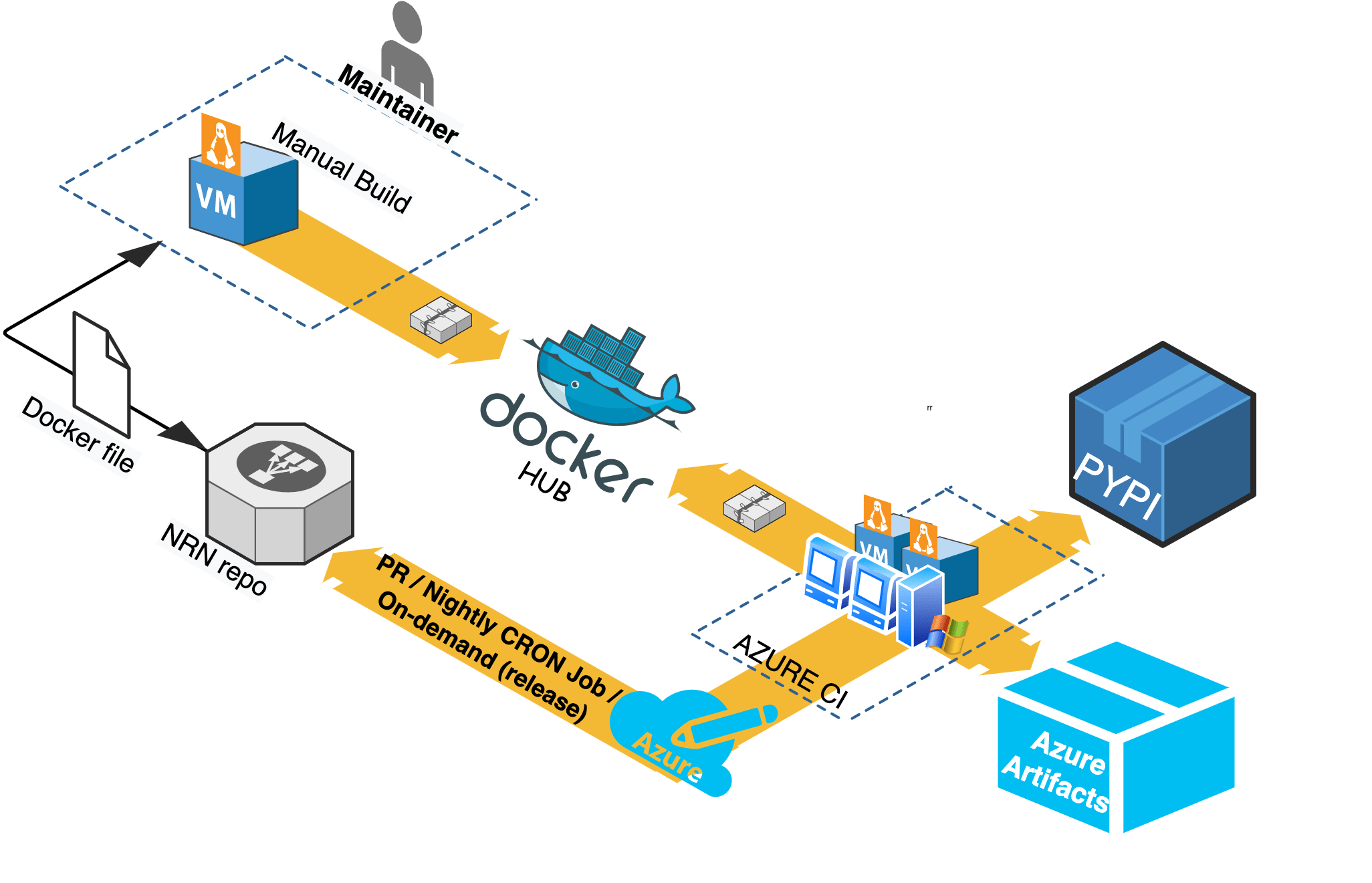
NEURON Docker Image Workflow
When required (i.e. update packages, add new software), NEURON maintainers are in charge of
updating the NEURON docker images published on Docker Hub under
neuronsimulator/neuron_wheel.
Azure pipelines pull this image off DockerHub for Linux wheels building.
Updating and publishing the public images are done by a manual process that relies on a
Docker file (see packaging/python/Dockerfile).
Any official update of these files shall imply a PR reviewed and merged before DockerHub publishing.
All wheels built on Azure are:
Published to
Pypi.orgasneuron-nightly-> when the pipeline is launched in CRON modeneuron-x.y.z-> when the pipeline is manually triggered for releasex.y.z
Stored as
Azure artifactsin the Azure pipeline for every run.
Refer to the following image for the NEURON Docker Image workflow:
Building the docker image manually
After making updates to any of the docker files, you can build the image with:
cd nrn/packaging/python
# update Dockerfile
docker build -t neuronsimulator/neuron_wheel:<tag> .
where <tag> is:
latest-x86_64orlatest-aarch64for official publishing on respective platforms. Formaster, we are usinglatest-gcc9-x86_64andlatest-gcc9-aarch64(see Use GCC9 for building wheels #1971).feature-namefor updates (for local testing or for PR testing purposes where you can temporarily publish the tag on DockerHub and tweak Azure CI pipelines to use it - refer toJob: 'ManyLinuxWheels'in azure-pipelines.yml )
If you are building an image for AArch64 i.e. with latest-aarch64 tag then you additionally pass --build-arg argument to docker build command in order to use compatible manylinux image for ARM64 platform (e.g. while building on Apple M1 or QEMU emulation):
docker build -t neuronsimulator/neuron_wheel:latest-aarch64 --build-arg MANYLINUX_IMAGE=manylinux2014_aarch64 -f Dockerfile .
Pushing to DockerHub
In order to push the image and its tag:
docker login --username=<username>
docker push neuronsimulator/neuron_wheel:<tag>
Using the docker image
You can either build the neuron images locally or pull them from DockerHub:
$ docker pull neuronsimulator/neuron_wheel:latest-x86_64
Using default tag: latest-x86_64
latest: Pulling from neuronsimulator/neuron_wheel
....
Status: Downloaded newer image for neuronsimulator/neuron_wheel:latest
docker.io/neuronsimulator/neuron_wheel:latest-x86_64
MPI support
The neuronsimulator/neuron_wheel provides out-of-the-box support for mpich and openmpi.
For HPE-MPT MPI, since it’s not open source, they are provided automatically as part of Azure Pipelines and are not locally downloadable.
macOS wheels
Note that for macOS there is no docker image needed, but all required dependencies must exist.
In order to have the wheels working on multiple macOS target versions, special consideration must be made for MACOSX_DEPLOYMENT_TARGET.
Taking Azure macOS x86_64 wheels for example, readline was built with MACOSX_DEPLOYMENT_TARGET=10.9 and stored as secure file on Azure (under Pipelines > Library > Secure files).
For arm64 we need to set MACOSX_DEPLOYMENT_TARGET=11.0.
You can use packaging/python/build_static_readline_osx.bash to build a static readline library. You can have a look at the script for requirements and usage.
Installing macOS prerequisites
Install the necessary Python versions by downloading the universal2 installers from https://www.python.org/downloads/macos/ You’ll need several other packages installed as well (brew is fine):
brew install --cask xquartz
brew install flex bison mpich cmake
brew unlink mpich && brew install openmpi
brew uninstall --ignore-dependencies libomp || echo "libomp doesn't exist"
Bison and flex installed through brew will not be symlinked into /opt/homebrew (installing it next to the version provided by OSX can cause problems). To ensure the installed versions will actually be picked up:
export BREW_PREFIX=$(brew --prefix)
export PATH=/opt/homebrew/opt/bison/bin:/opt/homebrew/opt/flex/bin:$PATH
Launch the wheel building
Linux
You can build the wheel for a specific Python version using:
bash packaging/python/build_wheels.bash linux 39 # 39 for Python v3.9
To build wheels with CoreNEURON support you have to set the environmental variable NRN_ENABLE_CORENEURON=ON:
NRN_ENABLE_CORENEURON=ON bash packaging/python/build_wheels.bash linux '3*'
where we are passing '3*' (note the quotes!) to build the wheels with CoreNEURON support for all python 3 versions.
By default, the build system uses all of the processing units available on a machine; this can be customized using the CMAKE_BUILD_PARALLEL_LEVEL environmental variable.
Note that using podman is supported, however, you must set the environmental variable CIBW_CONTAINER_ENGINE=podman before launching the build_wheels.bash script.
macOS
As mentioned above, for macOS all dependencies have to be available on a system. You have to then clone NEURON repository and execute:
cd nrn
bash packaging/python/build_wheels.bash osx 39  # 39 for Python v3.9
In some cases, setuptools-scm will see extra commits and consider your build as “dirty,” resulting in filenames such as NEURON-9.0a1.dev0+g9a96a3a4d.d20230717-cp310-cp310-macosx_11_0_arm64.whl (which should have been NEURON-9.0a0-cp310-cp310-macosx_11_0_arm64.whl). If this happens, you can set an environment variable to correct this behavior:
export SETUPTOOLS_SCM_PRETEND_VERSION=9.0a
Change the pretend version to whatever is relevant for your case.
Testing the wheels
To test the generated wheels, you can do:
# first arg is a python exe and second arg is the corresponding wheel
bash packaging/python/test_wheels.sh python3.9 wheelhouse/NEURON-7.8.0.236-cp39-cp39-macosx_10_9_x86_64.whl

# Or, you can provide the pypi url
bash packaging/python/test_wheels.sh python3.9 "-i https://test.pypi.org/simple/NEURON==7.8.11.2"
MacOS considerations
On MacOS, launching nrniv -python or special -python can fail to load neuron module due to security restrictions.
For this specific purpose, please export SKIP_EMBEDED_PYTHON_TEST=true before launching the tests.
Publishing the wheels on Pypi via Azure
Variables that drive PyPI upload
We need to manipulate the following three predefined variables, listed hereafter with their default values:
NRN_NIGHTLY_UPLOAD:trueNRN_RELEASE_UPLOAD:falseNEURON_NIGHTLY_TAG:-nightly
Release wheels
Head over to the neuronsimulator.nrn pipeline on Azure.
After creating the tag on the release/x.y or on the master branch, perform the following steps:
Click on
Run pipelineInput the release tag ref
refs/tags/x.y.zClick on
Advanced optionsthen selectVariablesUpdate driving variables to:
NRN_NIGHTLY_UPLOAD:falseNRN_RELEASE_UPLOAD:falseNEURON_NIGHTLY_TAG: undefined (leave empty)
Do so by clicking
VariablesinAdvanced optionsand update/clear the variable values.Click on
Run
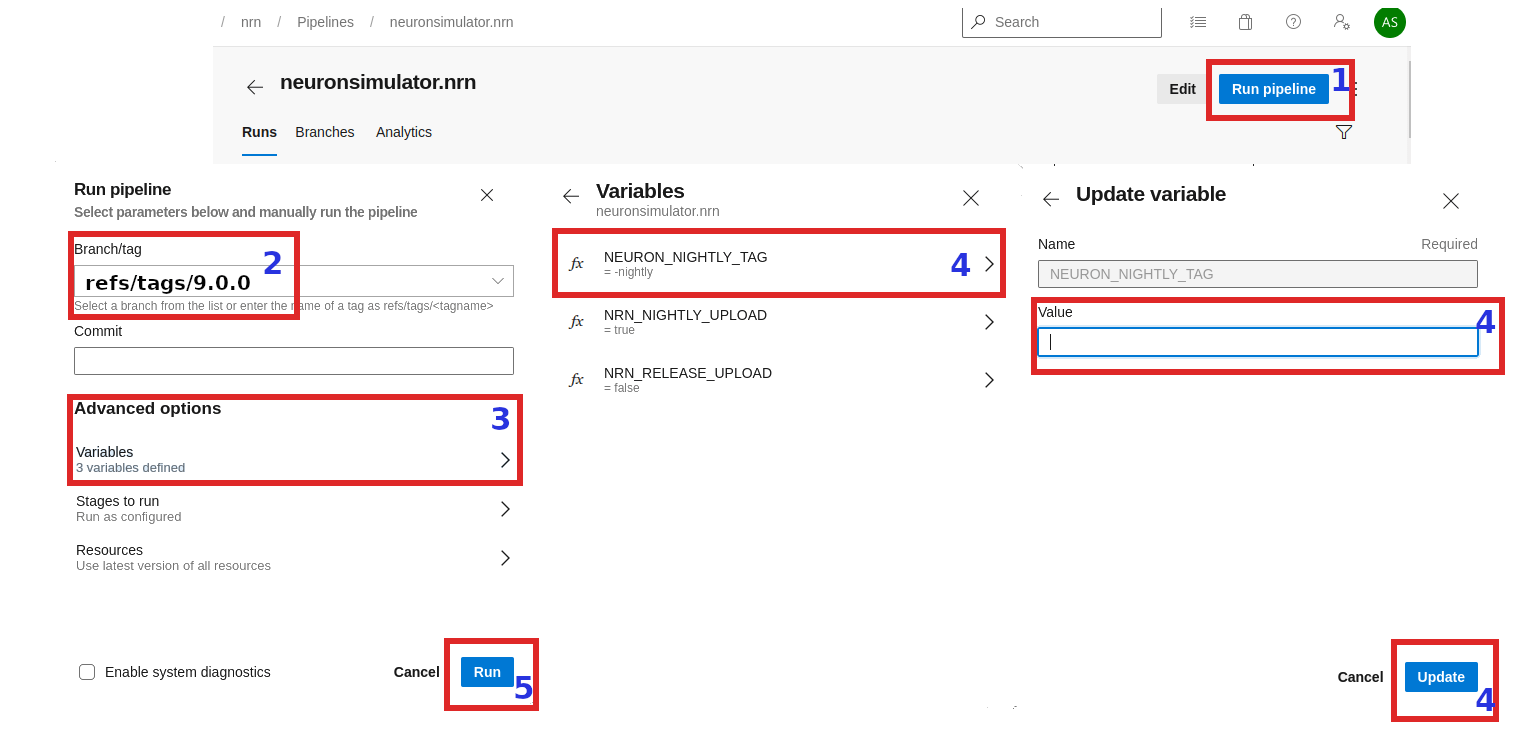
With above, wheel will be created like release from the provided tag but they won’t be uploaded to the pypi.org ( as we have set NRN_RELEASE_UPLOAD=false). These wheels now you can download from artifacts section and perform thorough testing. Once you are happy with the testing result, set NRN_RELEASE_UPLOAD to true and trigger the pipeline same way:
NRN_NIGHTLY_UPLOAD:falseNRN_RELEASE_UPLOAD:trueNEURON_NIGHTLY_TAG: undefined (leave empty)
Publishing the wheels on Pypi via CircleCI
Currently CircleCI doesn’t have automated pipeline for uploading release wheels to pypi.org (nightly wheels are uploaded automatically though). Currently we are using a hacky, semi-automated approach described below:
Checkout your tag as a new branch
Update
.circleci/config.ymlas shown belowTrigger CI pipeline manually for the nrn project
Upload wheels from artifacts manually
# checkout release tag as a new branch
$ git checkout 8.1a -b release/8.1a-aarch64

# manually updated `.circleci/config.yml`
$ git diff

@@ -14,6 +14,11 @@ jobs:

     machine:
       image: ubuntu-2004:202101-01
+    environment:
+      SETUPTOOLS_SCM_PRETEND_VERSION: 8.2.6
+      NEURON_NIGHTLY_TAG: ""
+      NRN_NIGHTLY_UPLOAD: false
+      NRN_RELEASE_UPLOAD: false

     resource_class: arm.medium

@@ -54,6 +59,7 @@ jobs:
               310) pyenv_py_ver="3.10.1" ;;
               311) pyenv_py_ver="3.11.0" ;;
+              312) pyenv_py_ver="3.12.2" ;;
               *) echo "Error: pyenv python version not specified!" && exit 1;;
             esac

@@ -95,7 +101,7 @@ workflows:
                 - /circleci\/.*/
           matrix:
             parameters:
-              NRN_PYTHON_VERSION: ["311"]
+              NRN_PYTHON_VERSION: ["310", "311", "312"]
               NRN_NIGHTLY_UPLOAD: ["false"]

   nightly:
The reason we are setting SETUPTOOLS_SCM_PRETEND_VERSION to a desired version 8.1a because pyproject.toml uses setuptools-scm and it will give different version name as we are now on a new branch!
SETUPTOOLS_SCM_PRETEND_VERSION will also stop your wheels from getting extra numbers on the version.
Nightly wheels
Nightly wheels get automatically published from master in CRON mode.
How to test Azure wheels locally
After retrieving the Azure drop URL (i.e. from the GitHub PR comment, or by going to Azure for a specific build):
python3 -m pip wheel neuron-gpu-nightly --wheel-dir tmp --find-links 'https://dev.azure.com/neuronsimulator/aa1fb98d-a914-45c3-a215-5e5ef1bd7687/_apis/build/builds/7600/artifacts?artifactName=drop&api-version=7.0&%24format=zip'
will download the wheel and its dependencies to tmp/ and then you can test it with:
./packaging/python/test_wheels.sh python3 ./tmp/NEURON_gpu_nightly-...whl true