
Glyph
-
class
Glyph - Syntax:
g = h.Glyph()- Description:
Specification of a drawing. The drawing can be rendered on a Graph as many times as desired using
graph.glyph(g, x, y, scalex, scaley, angle)
The drawing style uses commands reminiscent of postscript.
- Example:
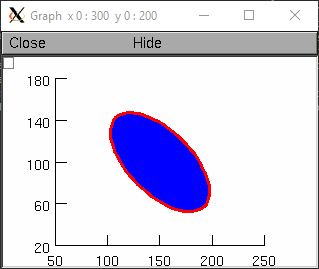
Rotated ellipse
from neuron import h, gui

gr = h.Graph()

gl = h.Glyph()
gl.circle(0,0,1)
gl.fill(3)
gl.s(2, 3)

gr.glyph(gl, 150, 100, 30, 60, h.PI/4*h.DEG)
See also
-
Glyph.path() - Syntax:
g = g.path()- Description:
- Begin a new path.
-
Glyph.m() - Syntax:
g = g.m(x, y)- Description:
- Set the current point to the coordinates.
-
Glyph.l() - Syntax:
g = g.l(x, y)- Description:
- A line from the current point to the coordinates.
-
Glyph.curve() - Syntax:
g = g.curve(x,y, x1,y1, x2,y2)- Description:
- Draw a curve from the current point to x,y
-
Glyph.close() - Syntax:
g = g.close()- Description:
- A line from the current point to the first point of the path.
-
Glyph.circle() - Syntax:
g = g.circle(x, y, r)- Description:
- A circle at location x, y and radius r. This is implemented using the glyph methods new_path, move_to, curve_to, and close_path. Can stroke and/or fill.
-
Glyph.s() - Syntax:
g = g.s()g = g.s(colorindex)g = g.s(colorindex, brushindex)- Description:
- Render the current path as a line.
-
Glyph.fill() - Syntax:
g = g.fill()g = g.fill(colorindex)- Description:
- For a closed path, fill the interior with the indicated color.
-
Glyph.cpt() - Syntax:
g = g.cpt(x,y)- Description:
- Draw a small open rectangle at the coordinates. Intended to indicate special locations on the glyph which can be selected. Not very useful at this time.
-
Glyph.erase() - Syntax:
g = g.erase()- Description:
- The drawing is empty
-
Glyph.label() - Syntax:
g = g.label("string", x, y, fixtype, colorindex)- Description:
- Not implemented
-
Glyph.glyph() - Syntax:
g = g.glyph(glyphobject, x, y, scale, angle)- Description:
- Not implemented
